
If you’ve typed ” n8n vs Make vs Zapier ” into Google — or searched for the best automation tools for small businesses and landed on all three — you’re probably staring at a stack of browser tabs, three pricing pages, and a nagging feeling that whichever tool you pick, you’ll regret it in six months. That feeling is fair — these three platforms solve the same core problem (connecting your apps so work happens without you) in genuinely different ways, and the “right” answer depends less on features and more on who’s actually going to build and maintain your workflows.
This isn’t another feature checklist copied from each vendor’s marketing page. It’s a practical breakdown of how n8n, Make, and Zapier actually behave once you’re running real workflows at real volume — including the pricing trap that catches almost everyone switching between them.
The Short Answer (For Those in a Hurry)
- Choose n8n if you have someone technical on your team (or don’t mind becoming that person), you run high-volume workflows, or self-hosting and data control matter to your business.
- Choose Make if you want serious visual workflow control — branching logic, routers, aggregators — without hiring a developer, and you’re comfortable with a steeper learning curve.
- Choose Zapier if you have zero technical resources, need the widest no-code automation tool app library, and want something running in under 30 minutes — for most solo operators and lean teams, this is where the search for the best automation tools for small businesses
If that’s enough for your decision, great. If you want the reasoning — especially around pricing, which is where most teams get burned — keep reading.
How Each Platform Actually Works
n8n: the technical, self-hostable option
n8n is the odd one out — and deliberately so. It’s open-source, can be fully self-hosted on your own infrastructure, and gives you actual code-level flexibility (custom JavaScript/Python functions inside nodes) alongside its visual builder. For teams building AI-powered or data-heavy workflows, n8n’s flexibility is hard to match — it added deep LangChain integration and dozens of AI-specific nodes, making it a favorite for teams building genuinely custom AI agent workflows rather than just connecting SaaS tools.
The catch is exactly what you’d expect: n8n rewards technical competence. If nobody on your team is comfortable with API documentation, JSON, or basic scripting, n8n’s ceiling is high but the entry cost is real.
Make: the visual middle ground
Make (formerly Integromat) trades some of Zapier’s simplicity for real visual power. Its drag-and-drop canvas shows your entire workflow as a flowchart — with routers, iterators, and aggregators that let you build genuinely sophisticated logic without writing code. For teams with intricate, multi-branch workflows, Make often achieves in one scenario what would take several separate Zaps and a higher-tier Zapier plan to replicate.
The learning curve is real, though. Make’s canvas rewards people who think in flowcharts and are willing to spend an afternoon understanding how data passes between modules. It’s not a 10-minute setup tool the way Zapier is.
Zapier: the on-ramp for non-technical teams
Zapier is the tool most marketers and operations teams meet first, and for good reason — it connects to the widest range of apps of the three, generally cited in the 7,000+ range, and its “Zap” builder is genuinely the fastest path from idea to working automation if you’ve never automated anything before. You pick a trigger, add actions, and you’re live. No canvas, no nodes, no code.
The trade-off is depth. Complex branching logic, multi-path conditionals, and heavy data transformation are possible in Zapier but get clunky fast, often pushing you toward higher-tier plans just to unlock the logic you need.
The Pricing Trap: Tasks vs. Operations vs. Executions
This is the part that trips up almost every team switching platforms, and it matters more than the sticker price on any pricing page.
- Zapier bills per task. Every single action in a workflow counts as a task — including filters and formatting steps. A 10-step Zap that runs 1,000 times a month burns through 10,000 tasks, not 1,000.
- Make bills per operation. Similar logic to Zapier — each module action, including triggers and filters, counts as one operation. A 5-step scenario uses 5 operations per run.
- n8n bills per execution. The entire workflow, regardless of how many steps it has, counts as one execution. A 10-step workflow running 10,000 times a month is 10,000 executions on n8n — versus potentially 100,000 tasks on Zapier for the identical workflow.
Run the math on a moderately complex, high-volume workflow and the gap is dramatic — some real-world comparisons show n8n cutting costs by 80–90% versus Zapier at scale, purely because of how the billing unit is defined, not because n8n is “cheaper” in some abstract sense. This is exactly why sticker-price comparisons between these three tools are close to useless — you have to model your actual workflow volume and step count before any pricing page means anything.
As of 2026, rough starting points look like this (verify current figures before committing, since all three vendors reprice fairly often):
- n8n: Free and unlimited if self-hosted (you cover your own infrastructure). Cloud-hosted plans start around $20/month.
- Make: Free tier gives 1,000 operations/month. Paid plans start around $9–$11/month for roughly 10,000 operations.
- Zapier: Free tier gives 100 tasks/month on 2-step workflows only. Paid plans start around $19.99/month for roughly 750 tasks, scaling up from there.
The practical takeaway: if your workflows are simple and low-volume, sticker price barely matters and Zapier’s simplicity wins. If you’re running thousands of executions a month through multi-step workflows, the billing model — not the monthly fee — determines your real cost, and that’s usually where n8n or Make start pulling ahead of Zapier by a wide margin.
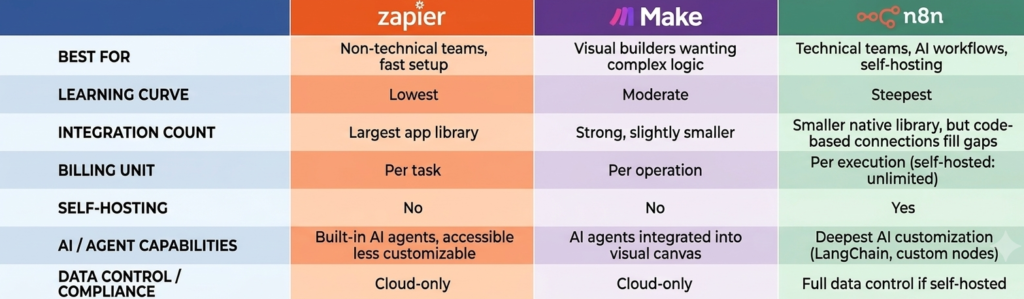
Feature Comparison at a Glance
Choosing by Use Case, Not Just by Tool
Feature tables help, but most teams make the wrong call because they compare tools in the abstract instead of against their actual use case. A few common scenarios:
A solo marketer or small business connecting a form tool to a CRM and Slack. This is Zapier’s home turf, and honestly the clearest case for it among the best automation tools for small businesses — low step count, low volume, zero appetite for a learning curve. Paying a premium per task doesn’t matter much when your total task count is small.
An agency running client workflows with conditional branching — different actions depending on lead source, budget, or region. This is where Make earns its reputation. You can build that logic visually without hiring a developer, and it tends to be meaningfully cheaper than replicating the same branching logic across multiple Zapier automations.
A product or ops team building AI-driven workflows — summarizing tickets, routing based on model output, chaining multiple AI calls together — at real volume. This is n8n’s strongest case. The per-execution billing model absorbs step-count growth without punishing you, and the code-level flexibility lets you do things the other two simply can’t.
A regulated business (healthcare, finance, legal) with data residency or compliance requirements. Self-hosted n8n is often the only real option among the three, since Zapier and Make are cloud-only and you don’t control where your data lives or how it’s processed.
Migration Considerations Nobody Mentions
Final Verdict
There isn’t a universally “best” platform here — there’s a best platform for your team’s technical capacity and workflow volume, and pretending otherwise is how most automation budgets get wasted.
- If you need something running today and nobody on your team writes code: start with Zapier.
- If you want serious visual logic without a developer, and you’re willing to invest an afternoon learning the canvas: Make is your sweet spot.
- If you have technical resources, care about data control, or you’re building AI-heavy workflows at real volume: n8n will outgrow the other two — but only if someone can actually maintain it.
The smartest move for most growing teams isn’t picking one forever — it’s starting with the tool that matches today’s technical capacity, and being honest with yourself about when workflow complexity or volume outgrows it. That review point, more than any single feature, is what actually determines whether your automation stack saves you money or quietly becomes another subscription nobody remembers signing up for.
Pricing and feature details reflect publicly available vendor information as of mid-2026. Automation platforms reprice and add features frequently — verify current plans directly on each vendor’s pricing page before making a purchasing decision.
Frequently Asked Questions (FAQs)
Most conventional bpo outsourcing companies use multi-month or annual contracts to lock in client revenue before proving execution quality. This business model shifts all operational risk, onboarding friction, and talent retention costs onto the client. We disrupt this approach by starting with a low-friction pilot program, allowing you to test performance in a live environment before making any long-term commitments.
Our pilot framework is a fully functional operational trial, not just a surface-level demo. During the pilot, our remote specialists step directly into your daily workflow to handle real back-office tasks—such as technical data entry, multi-channel customer tickets, medical billing, or invoice processing. We map your SOPs, audit speed and accuracy rates, and provide you with clear performance data so you can evaluate the team’s impact firsthand.
Reputable business process outsourcing companies maintain strict security protocols regardless of contract size or pilot duration. Prior to launching your pilot, we establish role-based access controls, operate within your existing software permissions, and sign comprehensive Non-Disclosure Agreements (NDAs). This ensures your proprietary operational data remains completely secure throughout the evaluation period.
Absolutely. One of the primary advantages of partnering with modern bpo outsourcing companies is obtaining resource elasticity. A pilot program allows growing businesses and startups to access high-quality remote talent without taking on massive executive overhead, minimum volume penalties, or complex procurement cycles. You scale your hours and team size up only when your workload demands it.
Once the pilot run finishes, we present a detailed operational report mapping out key metrics, quality accuracy, and speed benchmark results. If you are satisfied with the performance, we seamlessly transition your pilot setup into a permanent, full-time dedicated team arrangement without any workflow disruption or downtime.